When you explore topics such as AI chatbots, image generation, data analysis, and workflow automation, you will often encounter the name Python. Python is not a language used only for AI, but it is one of the first programming languages many people encounter when they want to understand and work directly with today's AI and data technologies.
So what exactly is Python, where is it used, and why has it received even more attention since generative AI became widespread? After looking at Python's major uses and the core syntax you need to know first, this guide will introduce Codedash's learning approach, where you can run code directly in your browser with nothing to install.
What Is Python?
Python is a programming language used to describe the tasks you want a computer to perform.
Just as people use languages such as English or Korean to communicate with one another, we use programming languages with defined rules to give instructions to computers. Python's syntax is relatively concise and its code is easy to read, so it is widely used for everything from introductory programming education to building real-world applications.
For example, the following Python code displays a sentence on the screen.
print("Hello")print() is a built-in Python function used to display text or numbers on the screen. Its readable name and simple structure make it relatively easy for people seeing code for the first time to follow what each line does.
Where Is Python Commonly Used?
Not every program is built with Python alone, but Python is especially common in the following fields.
| Field | What Python Is Used For |
|---|---|
| Artificial Intelligence and Machine Learning | Preparing data, training and evaluating models, and connecting AI features to services. |
| Data Analysis | Organizing large datasets, performing calculations, and reviewing the results in tables and charts. |
| Workflow Automation | Automating repetitive tasks such as organizing files, processing documents, performing repeated calculations, and connecting APIs. |
| Web Development | Handling features such as users, data, payments, and APIs on a server. |
| Science and Research | Calculating experimental data, running simulations, and visualizing research results. |
| Education and Prototyping | Testing ideas quickly with short programs and learning programming principles. |
Python offers a wide range of tools, including NumPy and pandas for data analysis, Django and FastAPI for web development, and PyTorch and TensorFlow for AI. The ability to combine proven tools instead of building every required feature from scratch is another reason Python is used across so many fields.
Why Python Has Become More Important in the AI Era
Python was already being used in artificial intelligence and data science before generative AI became widely known. More recently, Python skills have become important not only for developers researching AI models directly, but also for people who want to connect existing AI systems to their own work or services.
AI Tool Ecosystem
Many machine learning and deep learning libraries, examples, and learning resources provide Python interfaces.
Data and Automation
You can organize input data, save and inspect AI output, and connect it to other web services.
Generative AI APIs
You can build programs that send input to AI APIs and process the returned results for a specific purpose.
Simply sending a question to an AI model does not complete every task. You may also need to organize input data, process multiple sources repeatedly, save and inspect AI output, and connect it to other web services. Python can be used to automate these tasks as a single workflow.
Learning Python alone does not mean you will understand every AI technology. Studying AI in depth also requires mathematics, data, algorithms, and knowledge of the relevant field. Python can, however, be a practical starting point for putting ideas into action and working with AI tools.
Core Python Syntax to Learn First
You do not need to memorize all of Python's syntax at once. A good place to begin is understanding that code runs from top to bottom, then learning variables, conditionals, loops, and functions in order.
1. Output and Function Calls
print("Starting Python.")print is the function's name, and () means that the function is being called and run. The string inside the parentheses is a value passed to the function.
2. Variables and Values
name = "Cody"
energy = 3

print(name)
print(energy)
A variable is a place that stores a value under a name for use in a program. Here, the string "Cody" is stored in name, and the integer 3 is stored in energy. In Python, = means to store the value on the right in the variable on the left.
3. if/else Conditionals
energy = 3

if energy > 0:
    print("You can move.")
else:
    print("Not enough energy.")
Conditionals run different code depending on the situation. If energy > 0 is true, the code under if runs; if it is false, the code under else runs. The : at the end of the line and the indentation of the lines below it are also part of Python's syntax.
4. for and while Loops
You can use for when you want to repeat something a set number of times.
for step in range(3):
    print("Moving one space.")
You can use while when the number of repetitions is not known in advance and the code should keep running while a particular condition is true.
steps = 3

while steps > 0:
    print("Moving one space.")
    steps = steps - 1
A while loop repeats its indented code while its condition is true. If steps is not reduced by 1 inside the loop, the condition may remain true and create an infinite loop, so you also need to consider how the loop will end.
5. Creating Functions
def greet(name):
    print(name + ", nice to meet you.")

greet("Cody")
A function groups a sequence of instructions under one name so it can be reused. Here, def defines the greet function, and greet("Cody") calls it with the required value.
Storing state in variables, making decisions with conditionals, reducing repeated code with loops, and grouping behavior in functions form the basic structure of a Python program.
Reading Syntax and Applying It to Problems Are Different Skills
Reading that if evaluates a condition and while repeats code may not be enough to immediately know which syntax to use in a real problem.
For example, if a character needs to change direction depending on whether there is an obstacle ahead, you need a conditional. If the character must repeat the same action until reaching the goal, you need to think about both a loop and its ending condition. The role of each syntax feature becomes clearer when you choose and run it yourself while solving a problem.
For beginners, installing Python and a code editor on a computer while also learning how to run files can feel like a burden. Running short programs in a browser and seeing the results immediately lets you focus first on syntax and program flow.
Practice Directly in Your Browser with Codedash
Codedash is a coding education website where you can run games in your browser and practice Python syntax without installing a separate Python runtime or code editor.
Codedash offers games such as Python Dungeon, Python Farm, and Python Mine, where you use code to complete missions. You move a character, inspect its surroundings, write the required actions in code, and see the results immediately on the game screen.
Learning Interface
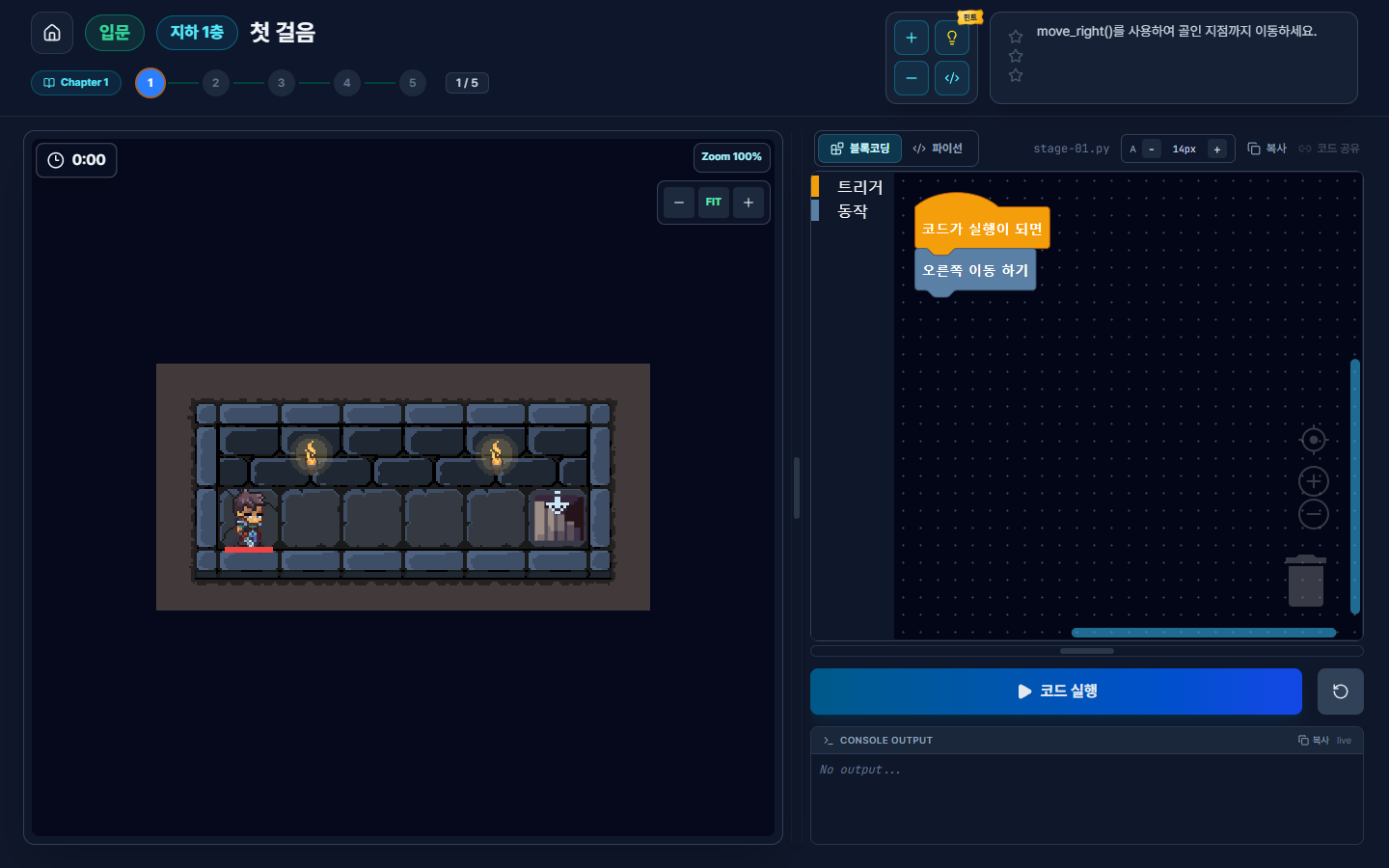
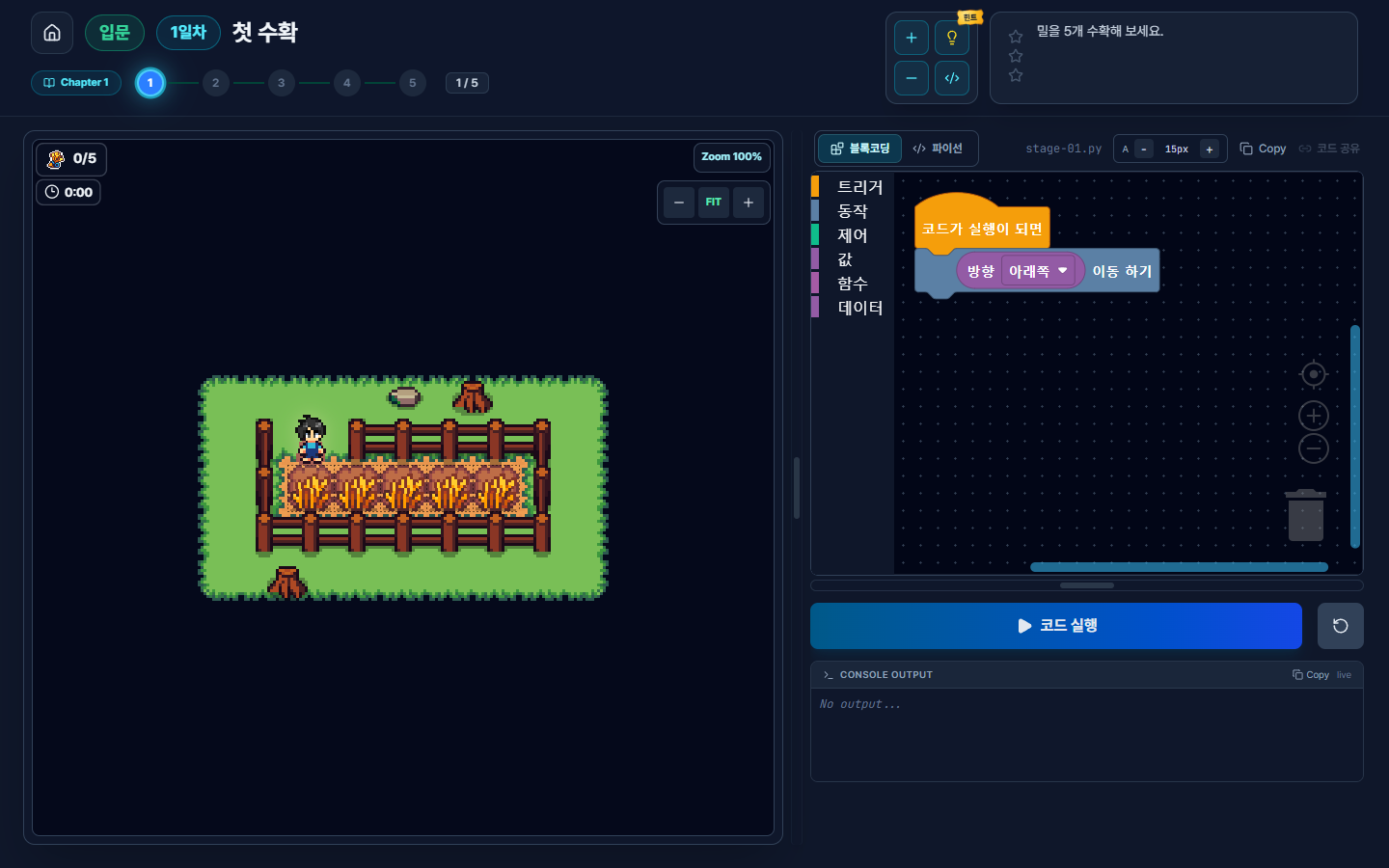
if/else and while.If text-based code is not yet familiar, you can first see the order and structure of actions with blocks. You can then write a solution to the same problem in Python and compare how the block structure is expressed as actual syntax.
Choose actions based on conditions, repeat the same actions, and organize multiple actions into functions.
Watch the character move, identify the line where an error occurred, then revise and run the code again.
For levels that require conditional decisions, the intended solution uses if/else; for levels that repeat actions until a condition is met, it uses while. A fixed list of commands cannot easily respond to changing situations, so you need to understand the relevant syntax and construct a solution suited to the problem.
Your First Mission: Move the Character with move_right()
The first level of Python Dungeon Chapter 1 is called First Steps. Its goal is simple.
Use
move_right()to reach the goal.
This level uses just one game command.
move_right()- When you first enter the level, the
Block Codingtab is open by default with one move-right block in place. - Select the
Pythontab to write text-based code directly. - Below the existing line of
move_right()in the code editor, add the same command on four more lines for a total of five. - Select
Run Codeand check whether the character reaches the goal.
Each call to move_right() moves the character one space to the right. To move five spaces from the starting point to the goal, you can write the following code.
move_right()
move_right()
move_right()
move_right()
move_right()When you select Run Code, the five function calls are processed from top to bottom, and the character moves right until it reaches the goal.
Here, move_right() is not a built-in Python function. It is a game-specific function provided by Python Dungeon. It still uses standard Python function-call syntax, so the code demonstrates the following concepts.
Function Name
move_right is the name of the action to run and means "move to the right."
Parentheses
() is the notation that calls a function and asks it to run. The function is called without any arguments in the first level.
Execution Order
The calls in the first level are processed from top to bottom, and the character moves once for each use of the function.
Even this short program contains important Python fundamentals: a function call, parentheses, and top-to-bottom execution order.
Play Every Chapter for Free Without Logging In
Every Python Dungeon chapter, from Chapter 1 to Chapter 8, is free to play without signing up or logging in. Your progress is saved in the browser you use.
Chapter 2 unlocks after you complete all five levels in Chapter 1. Later chapters unlock in order as you complete each preceding chapter. You begin with short commands such as move_right(), then move on to missions that involve traveling in several directions or checking the situation in the game.
Chapters 1–8
All levels are available without login or payment.
There is no account to create, so you can start with Chapter 1 right away. Each new chapter unlocks once you complete the one before it.
Who Is It For?
- Students encountering Python for the first time
- People interested in AI and data who want to learn Python from the basics
- People who want to run code before installing anything
- Parents who want to explore their child's interest in coding
- Teachers or instructors who want to begin lessons with game missions
- Learners moving from block coding to text-based coding
Codedash is not a course that teaches every Python feature at once or has you develop a game directly with Python. It is a learning environment where you use a limited set of game functions and missions to practice concepts such as function calls, execution order, conditionals, and loops.
Run Your First Python Program
Python is used in fields such as AI, data analysis, automation, and web development. On Codedash, you can run your first mission with block coding or Python code without installing a separate program.
Start Python Dungeon Chapter 1You can run the first level without signing up or paying.
If the character reached the goal, you have experienced Python function calls and code execution order firsthand. In later levels, observe the game screen and choose the necessary actions and syntax yourself.
Frequently Asked Questions
Can I build AI by learning only Python?
Python is widely used for working with AI tools and processing data, but Python syntax alone is not enough to understand every AI technology. Studying AI in depth also requires an understanding of mathematics, data, algorithms, and the relevant problem domain. Python is a good starting point for experimenting with and implementing these concepts in code.
Do I need to install Python?
No. Python Dungeon on Codedash runs in a browser, so you can get started without installing a separate Python runtime or code editor. On the first run, the browser may need some time to prepare the Python runtime and game resources.
Do I need to sign up?
No. You can play every chapter without signing up or logging in. Your progress is saved in the browser you use.
Can I use move_right() in regular Python?
No. move_right() is a game function provided by Python Dungeon. A function with that name is not included by default in a regular Python environment. On Codedash, you practice Python's function-call syntax by calling this game function.
Do I have to use only block coding?
No. In Python Dungeon, you can switch between the Block Coding and Python tabs. After first reviewing the sequence of actions with blocks, you can write the Python code directly.
Are all Python Dungeon chapters free?
Yes. Every chapter from Chapter 1 to Chapter 8 is free and needs no login. Each chapter unlocks after you complete the previous one.