When you first learn Python, new terms such as if, else, while, variables, and functions appear all at once. Each concept may seem clear when you read about it, but when you face an empty code editor, it can be difficult to know which syntax to use first.
Syntax is not a list of words to memorize. It is a set of tools for solving problems. The purpose of each concept becomes clear when you use it to move a character five spaces, attack a slime ahead, or choose a path based on a signpost.
Codedash's Python Dungeon is a game-based learning environment where you can solve the same problem with block coding or Python code. This guide explores Python's core syntax through the following six levels.
| Level | Game Mission | Core Syntax |
|---|---|---|
| Chapter 1-1 First Steps | Move five spaces to the right | Function calls and execution order |
| Chapter 1-5 Round and Round | Move repeatedly along the walls | while loops and variables |
| Chapter 2-1 Slime Ambush | Detect and attack enemies | Conditions and loops |
| Chapter 3-2 Fork of Fate | Choose a path based on a signpost | Variables and if/else |
| Chapter 4-2 Addition Door | Add two numbers to open a door | Variables and addition |
| Chapter 5-1 Secret of the Magic Rune 2 | Travel the same route twice | while loops |
The code in this guide provides example solutions designed to explain each level. You can write different code that achieves the same goal.
Some block screens below show the result of automatically converting the example Python code in the Block Coding tab for comparison. The range of blocks available directly from the default block list may vary depending on your progress through the levels.
Core Python Syntax to Know First
Function Calls
Add parentheses after a function name to run a predefined action.
move_right()Variables and Assignment
Store a value that the program needs to remember under a name.
steps = 0if/else
Run one of two different blocks of code based on a condition.
if is_enemy_right():
    attack_right()
else:
move_right()while
Keep running the indented code while a condition is true.
steps = 0
while steps < 5:
    move_right()
steps = steps + 1Comparisons and not
Compare values and reverse true and false to create conditions.
not is_downstairs()Indentation
Indent code inside conditionals and loops to the same depth.
if is_enemy_right():
    attack_right()
In block coding, placing one block inside another corresponds to indentation in Python code. Movement functions such as move_right() are not built-in Python functions; they are game-specific functions provided by Python Dungeon. Now let's see how each syntax concept is used in actual levels.
Chapter 1-1 First Steps: Function Calls and Execution Order
CHAPTER 1 · LEVEL 1
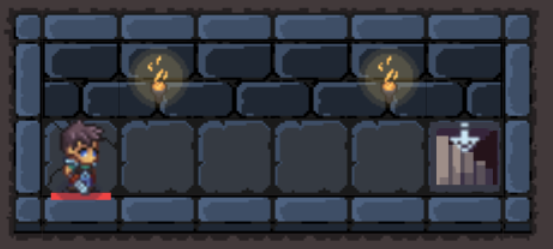
The goal of the first level is to use move_right() to send the character to the goal. The character must move five spaces from the starting point to the goal, so you run the move-right action five times.
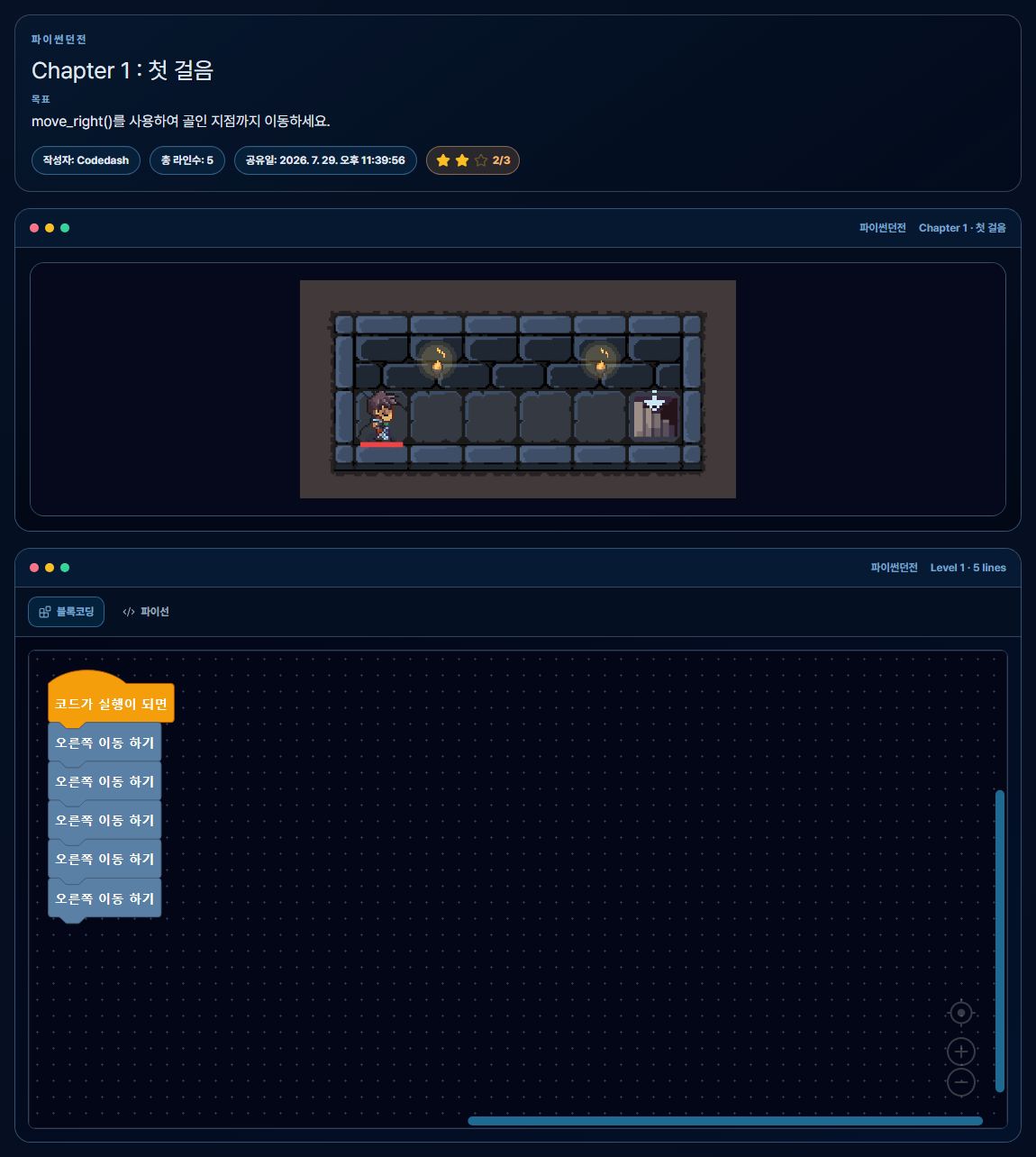
Solution in Blocks
[Run Code]
  └─ [Move Right]
      └─ [Move Right]
          └─ [Move Right]
              └─ [Move Right]
└─ [Move Right]Python Code Solution
move_right()
move_right()
move_right()
move_right()
move_right()
When you connect blocks from top to bottom, the character moves in the order in which the blocks are connected. Python code also runs one line at a time from top to bottom. This level demonstrates function calls, parentheses, and execution order.
Chapter 1-5 Round and Round: Repeating Movement with while
CHAPTER 1 · LEVEL 5
In Chapter 1-5, you follow the walls in this sequence: up 6 spaces → right 5 spaces → down 4 spaces → left 3 spaces → up 2 spaces → right 1 space.
You could write the same movement function on many separate lines, but a while statement and a variable that stores the number of moves let you express the structure as "keep moving until the specified condition is no longer met."
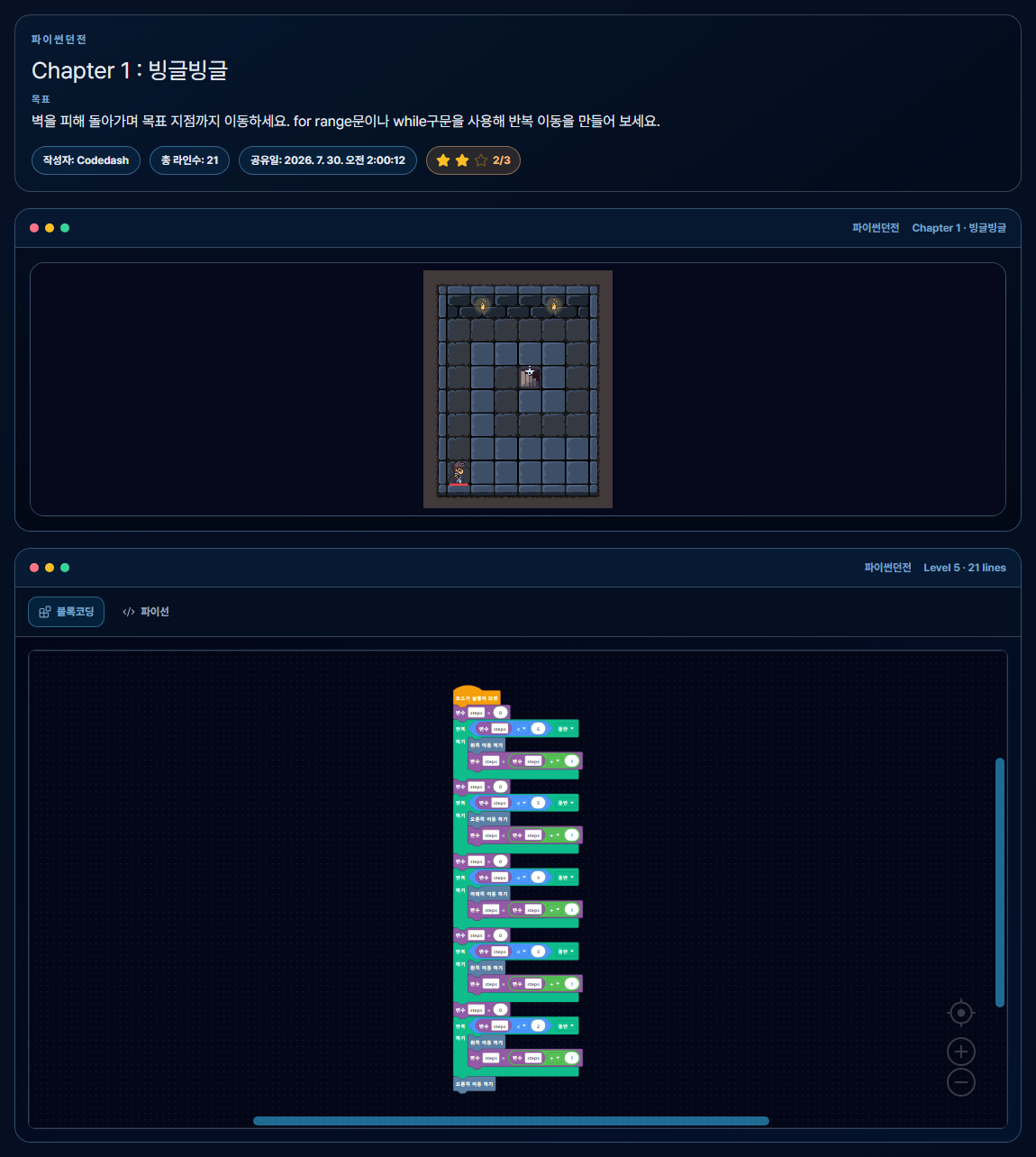
Solution in Blocks
[Set steps to 0]
[Repeat while steps < 6]
  ├─ [Move Up]
  └─ [steps = steps + 1]

Using the same structure,
repeat right 5 times,
down 4 times,
left 3 times,
and up 2 times

[Move Right]Python Code Solution
steps = 0
while steps < 6:
    move_up()
    steps = steps + 1

steps = 0
while steps < 5:
    move_right()
    steps = steps + 1

steps = 0
while steps < 4:
    move_down()
    steps = steps + 1

steps = 0
while steps < 3:
    move_left()
    steps = steps + 1

steps = 0
while steps < 2:
    move_up()
    steps = steps + 1

move_right()
You can also solve this level with for ... in range(...). The default block list lets you build a simpler solution with count-based repeat blocks, but here the Python code was converted into blocks so you can compare the while condition, counter variable, and stopping point together.
Chapter 2-1 Slime Ambush: Check the Situation and Attack
CHAPTER 2 · LEVEL 1
There are slimes in the middle of the path. If the character only moves forward, an enemy will block the way, so you need to check whether an enemy is to the right and attack first when one is present.
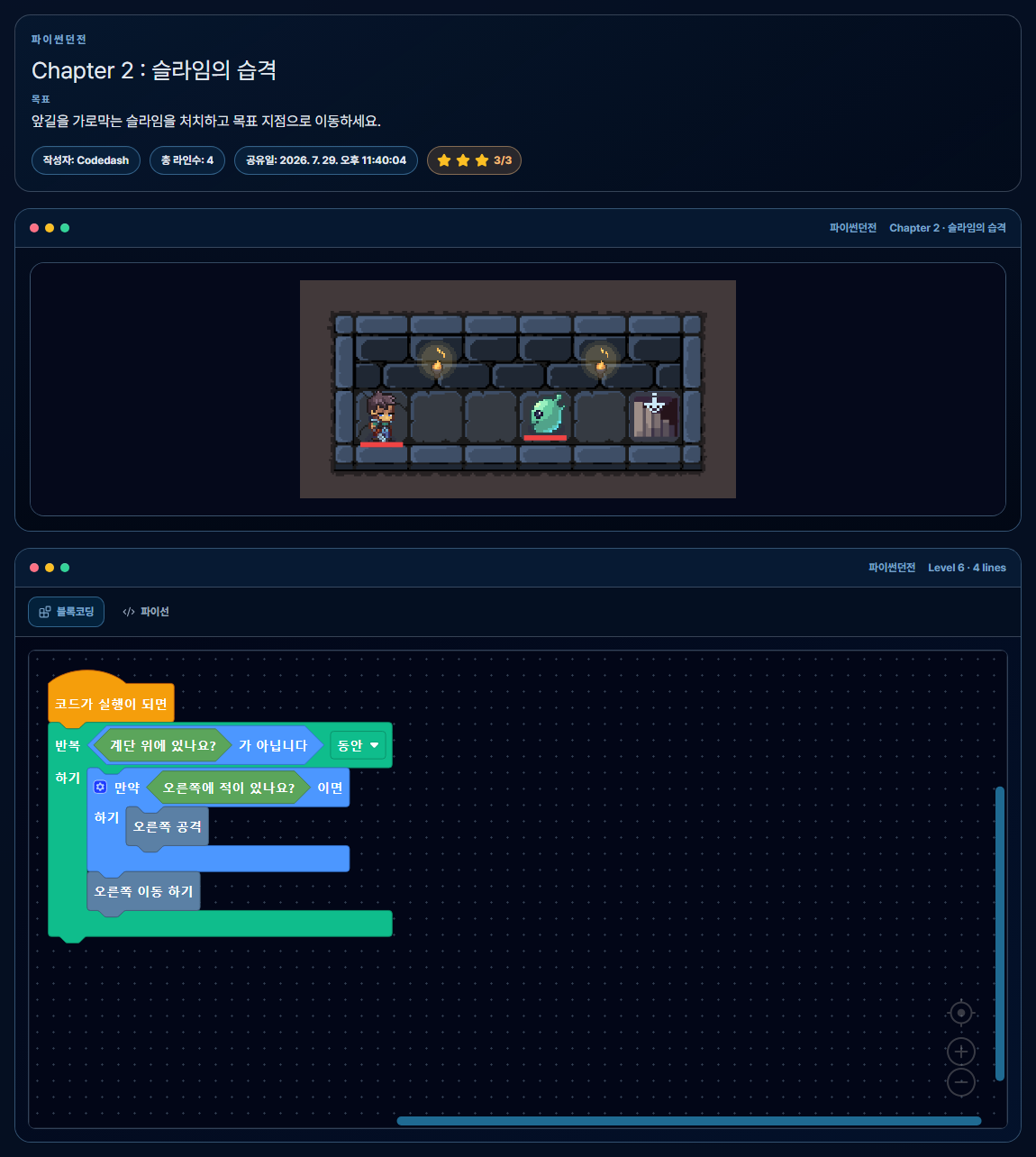
Solution in Blocks
[Repeat while not at the stairs]
  ├─ [If there is an enemy to the right]
  │    └─ [Attack Right]
└─ [Move Right]Python Code Solution
while not is_downstairs():
    if is_enemy_right():
        attack_right()
    move_right()
is_enemy_right() checks whether an enemy is to the right and returns true or false. The if statement runs attack_right() only when the result is true. The while statement repeats the detection and movement until the character reaches the goal.
not is a logical operator that reverses true and false. You can therefore read not is_downstairs() as the condition "the character has not reached the goal yet." The detection-condition block on this screen was generated by converting the Python solution into blocks.
You can solve this level by writing a fixed sequence of movement and attack commands, but a conditional creates a general problem-solving structure that checks for an enemy and responds when one is present.
Chapter 3-2 Fork of Fate: Variables and if/else
CHAPTER 3 · LEVEL 2
Each time you run this level, the signpost returns either "up" or "down". If you always choose one fixed path, you may fail depending on the signpost's result. Instead, store the direction you read in a variable and choose the path with if/else.
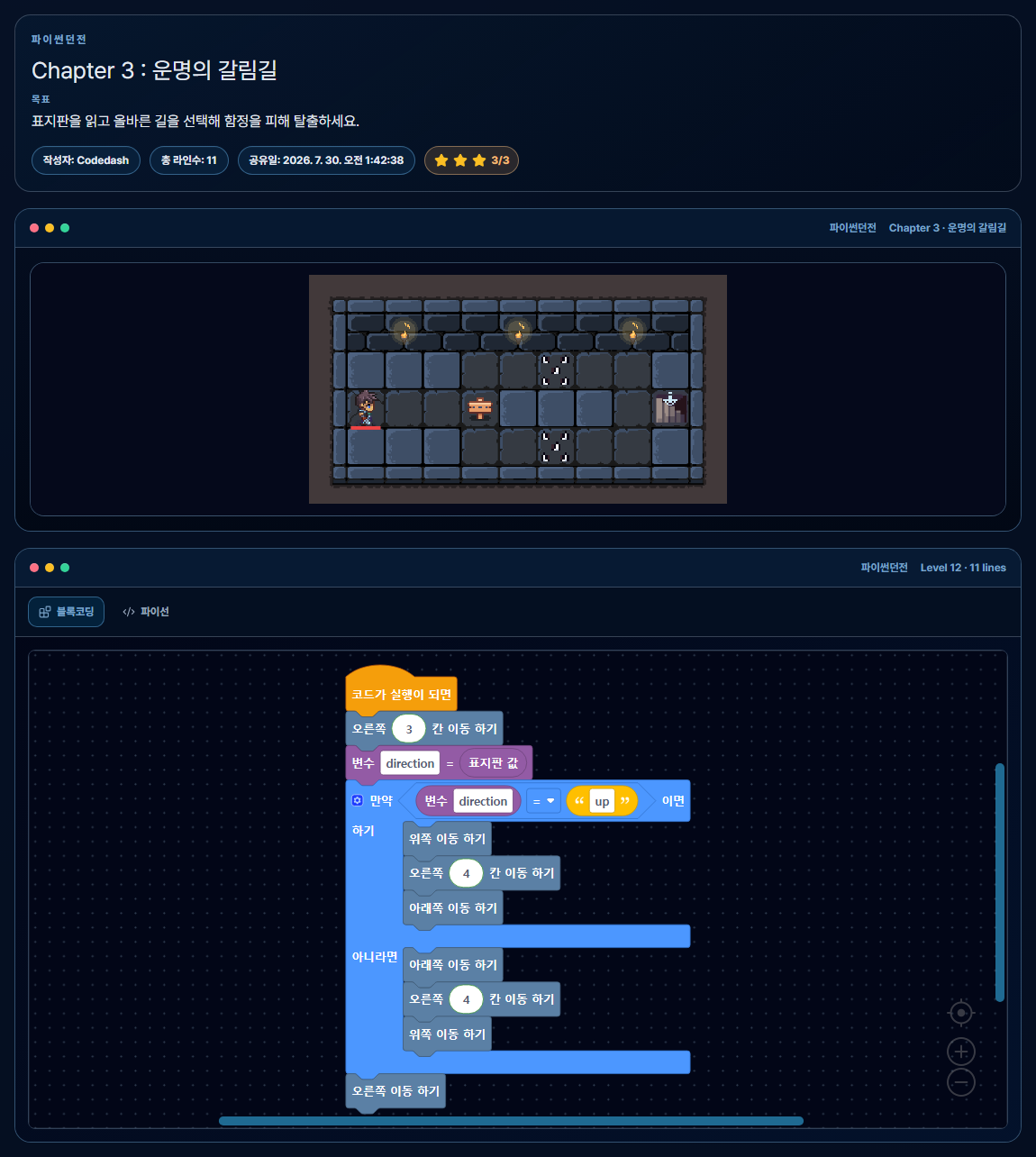
Solution in Blocks
[Move Right 3 Spaces]
[direction = signpost value]
[If direction == "up"]
  ├─ [Move Up 1 Space]
  ├─ [Move Right 4 Spaces]
  └─ [Move Down 1 Space]
[Otherwise]
  ├─ [Move Down 1 Space]
  ├─ [Move Right 4 Spaces]
  └─ [Move Up 1 Space]
[Move Right 1 Space]Python Code Solution
move_right(3)
direction = read_signpost()

if direction == "up":
    move_up()
    move_right(4)
    move_down()
else:
    move_down()
    move_right(4)
    move_up()

move_right()- Store the signpost result in the
directionvariable. - Use the
==comparison operator to check whether the value is"up". - Use
if/elseto run only one of the two paths, upper or lower.
Comparing the block's two-branch structure with Python indentation makes it easy to see which if an else belongs to.
Chapter 4-2 Addition Door: Add and Use Two Values
CHAPTER 4 · LEVEL 2
The dungeon contains two scrolls with numbers and a locked door. The numbers on the scrolls can change each time the level runs, so you cannot write the answer in advance. Store each value in a variable, add the two numbers, and use the result to open the door.
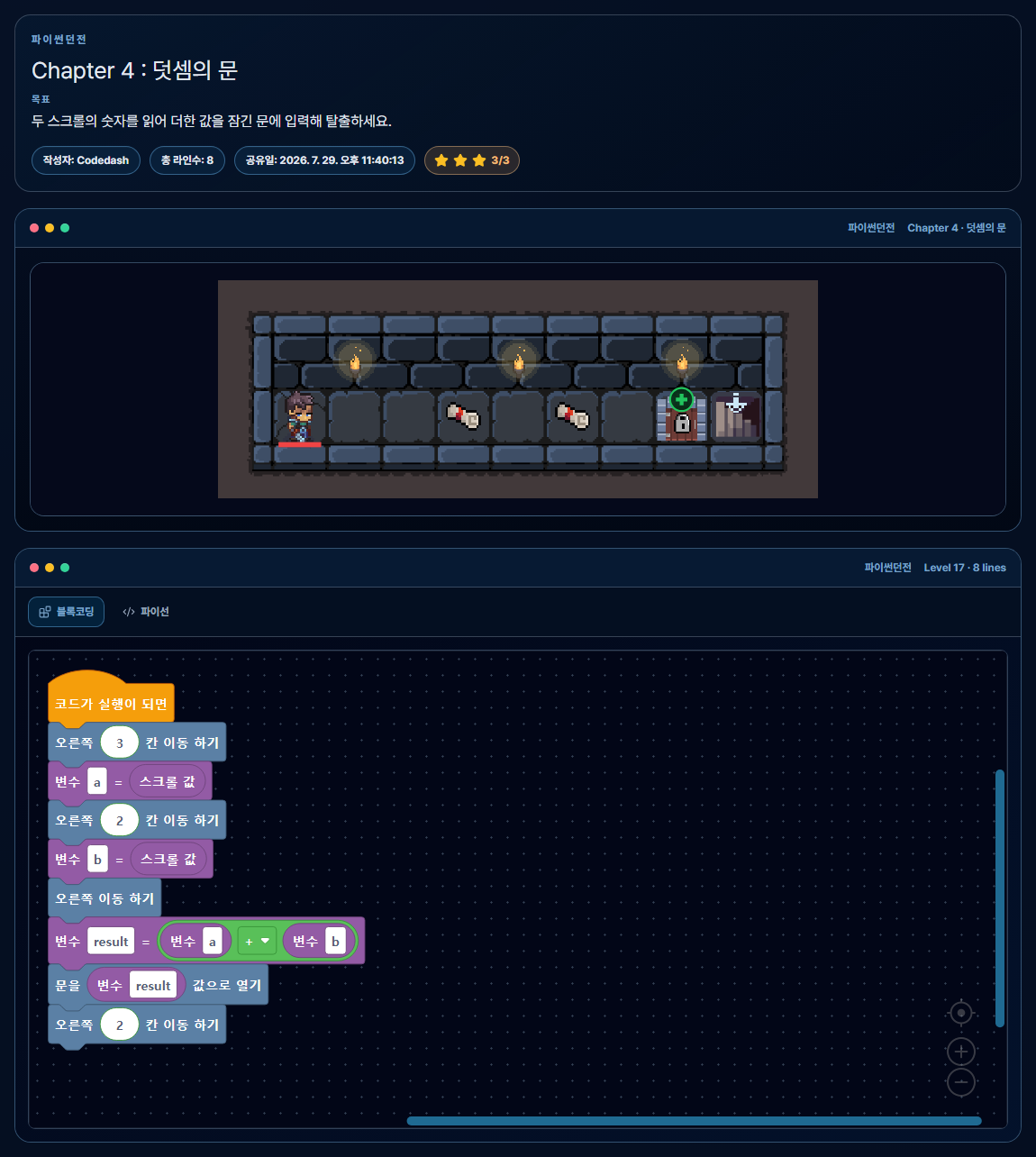
Solution in Blocks
[Move Right 3 Spaces]
[a = scroll value]
[Move Right 2 Spaces]
[b = scroll value]
[Move Right 1 Space]
[result = a + b]
[Unlock Door with result]
[Move Right 2 Spaces]Python Code Solution
move_right(3)
a = read_scroll()

move_right(2)
b = read_scroll()

move_right()
result = a + b
unlock_door(result)
move_right(2)
In a + b, + is an arithmetic operator that adds two numbers. The calculation is stored in the result variable and then passed to unlock_door(result).
This level goes beyond evaluating a simple addition expression. It demonstrates the fundamental program flow of reading input → storing it in variables → calculating → passing the result to a function.
Chapter 5-1 Secret of the Magic Rune 2: Repeat the Same Route with while
CHAPTER 5 · LEVEL 1
In Chapter 5-1, you must step on each magic rune around a rectangle twice. Because the route around the perimeter stays the same and only the number of repetitions is two, you can put the actions for one lap inside a while statement.
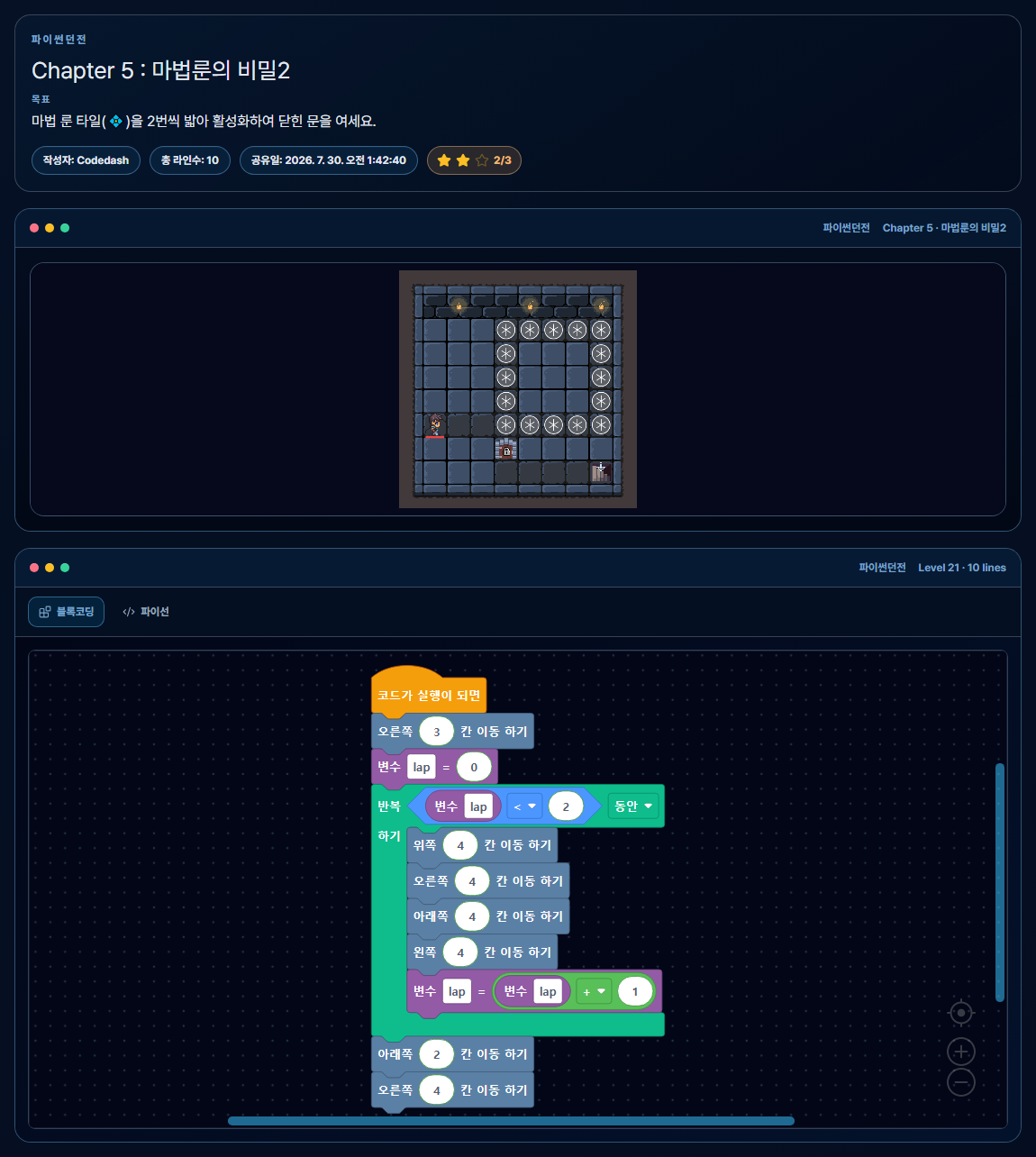
Solution in Blocks
[Move Right 3 Spaces]
[Set lap to 0]
[Repeat while lap < 2]
  ├─ [Move Up 4 Spaces]
  ├─ [Move Right 4 Spaces]
  ├─ [Move Down 4 Spaces]
  ├─ [Move Left 4 Spaces]
  └─ [lap = lap + 1]
[Move Down 2 Spaces]
[Move Right 4 Spaces]Python Code Solution
move_right(3)

lap = 0
while lap < 2:
    move_up(4)
    move_right(4)
    move_down(4)
    move_left(4)
    lap = lap + 1

move_down(2)
move_right(4)
lap stores the number of laps completed so far. Add 1 after each lap and end the loop when lap < 2 becomes false. You can also solve this level with for, but this example uses a counter variable to demonstrate how while checks a condition and ends a loop.
Why It Helps to View Block Coding and Python Code Together
The Execution Structure Is Visible
In block coding, the condition area of if, the execution area of else, and the actions repeated inside while are visually separated.
Express the Same Problem with Real Syntax
You can compare how nested blocks become : and indentation in Python, while function calls become a name followed by parentheses.
Syntax Has a Clear Purpose
Use a loop to activate runes and a conditional to choose the correct path for a random signpost result.
See the Result Immediately
When you run the code, movement, attacks, and door-unlocking results appear in the game. If the result differs from what you expected, you can revise the code and run it again.
Codedash runs in the browser without requiring a separate Python environment. Instead of learning block coding and text coding as separate courses, you can compare them as two representations of the same problem.
Explore Python's Core Syntax Through a Game
Every Python Dungeon chapter is free to play without logging in or paying. The first level introduces function calls and execution order, and later levels gradually add repetition, enemy detection, conditional branches, variables, calculations, and other problems to solve.
Start Python Dungeon Chapter 1Chapter 2 unlocks after you complete all five levels in Chapter 1.
You cannot skip directly to later chapters; each one unlocks only after you complete the previous chapter. All chapters from Chapter 1 to Chapter 8 are free, with no sign-up or login required.
Frequently Asked Questions
Do I have to solve every level using only block coding?
No. In Python Dungeon, you can switch between the Block Coding and Python tabs. You can first inspect the structure with blocks or write Python code directly.
Is the code in this guide the only correct answer?
No. Many different programs can achieve the same goal. This guide selects solutions that clearly demonstrate each level's core syntax.
How are for and while different?
for is often more concise when the number of repetitions is known, while while is appropriate when repetition must continue as long as a specific condition is true. You can also solve the same level both ways and compare the code structures.
Are the levels from Chapter 3 onward also free?
Yes. Every chapter is free and needs no login. You still need to complete each chapter to unlock the next one.