When you first learn Python syntax, it is easy to memorize functions, loops, conditionals, and dictionaries separately. In real programs, however, you combine several syntax features to read the current state and decide what to do next.
Farming follows the same structure. You till the field, plant seeds, water them, wait until the crops are fully grown, and then harvest them. If water is limited or the field is dark, you need to check the soil and crop conditions and select only the actions that are needed.
Codedash's Python Farm is a game-based learning environment where you automate this process with block coding and Python code. This guide follows six levels, from basic function calls through dictionaries, nested loops, and state-based problem solving.
| Level | Game Mission | Core Syntax |
|---|---|---|
| Chapter 1-1 First Harvest | Harvest 5 wheat crops | Function calls and execution order |
| Chapter 2-5 Farmer Basics | Automate the process from tilling to harvesting | for, while, and combining functions |
| Chapter 3-5 Basics - Onion Farming | Grow 25 onions with limited water | Ground state and if/else |
| Chapter 4-1 Check Growth Status | Harvest only 2 ripe tomatoes | Reading dictionary values |
| Chapter 6-5 Night Work: Weed Out Wrong Crops | Remove crops that do not match the signs | Dictionaries, conditionals, and nested loops |
| Chapter 8-3 Legendary 64-Tile Pumpkin | Complete an 8×8 merged pumpkin | Two-dimensional traversal and state control |
The code in this guide provides example solutions for understanding each level. You can write other code that achieves the same goals.
Some of the block screens below show the results of automatically converting the example Python code in the Block Coding tab for comparison. The blocks available directly from the standard block list may vary depending on your progress through the levels.
The solution code for Chapter 8-3 is withheld to preserve the challenge of the final mission. This guide shows only the completed Legendary 64-Tile Pumpkin just before harvest and the conditions you need to solve.
Core Python Syntax to Know First
Game Functions and Enums
Pass directions and crop types to functions to execute the farmer's actions.
move(Dir.Down)
plant(Res.Tomato)Fixed-Count Loops
Run the same action a specified number of times.
for i in range(5):
harvest()Conditional Loops
Wait until a crop is ready, checking its state again each time.
while not can_harvest():
wait(1)if/else
Choose a different action based on the current soil or crop state.
if ground == Ground.Tilled:
    water()
else:
wait(1)Dictionaries
Use keys to read ripeness values or messages on signs.
status = get_res_status()
status['ripeness']Nested Loops
Combine row and column loops to traverse a large field.
for row in range(4):
    for column in range(5):
        harvest()
Functions such as move(), plant(), and harvest() are not Python built-in functions; they are game-specific functions provided by Python Farm. for, while, if/else, dictionaries, and indentation are actual Python syntax.
Chapter 1-1 First Harvest: Move and Harvest
CHAPTER 1 · LEVEL 1
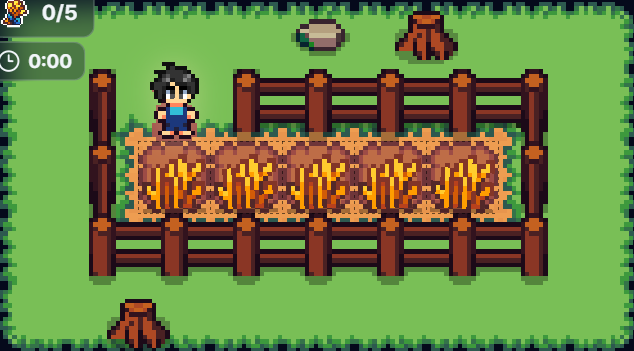
The goal of the first level is to move down to the field and harvest five ripe wheat crops. Repeat the sequence of calling harvest() on the current tile and then moving to the next tile.
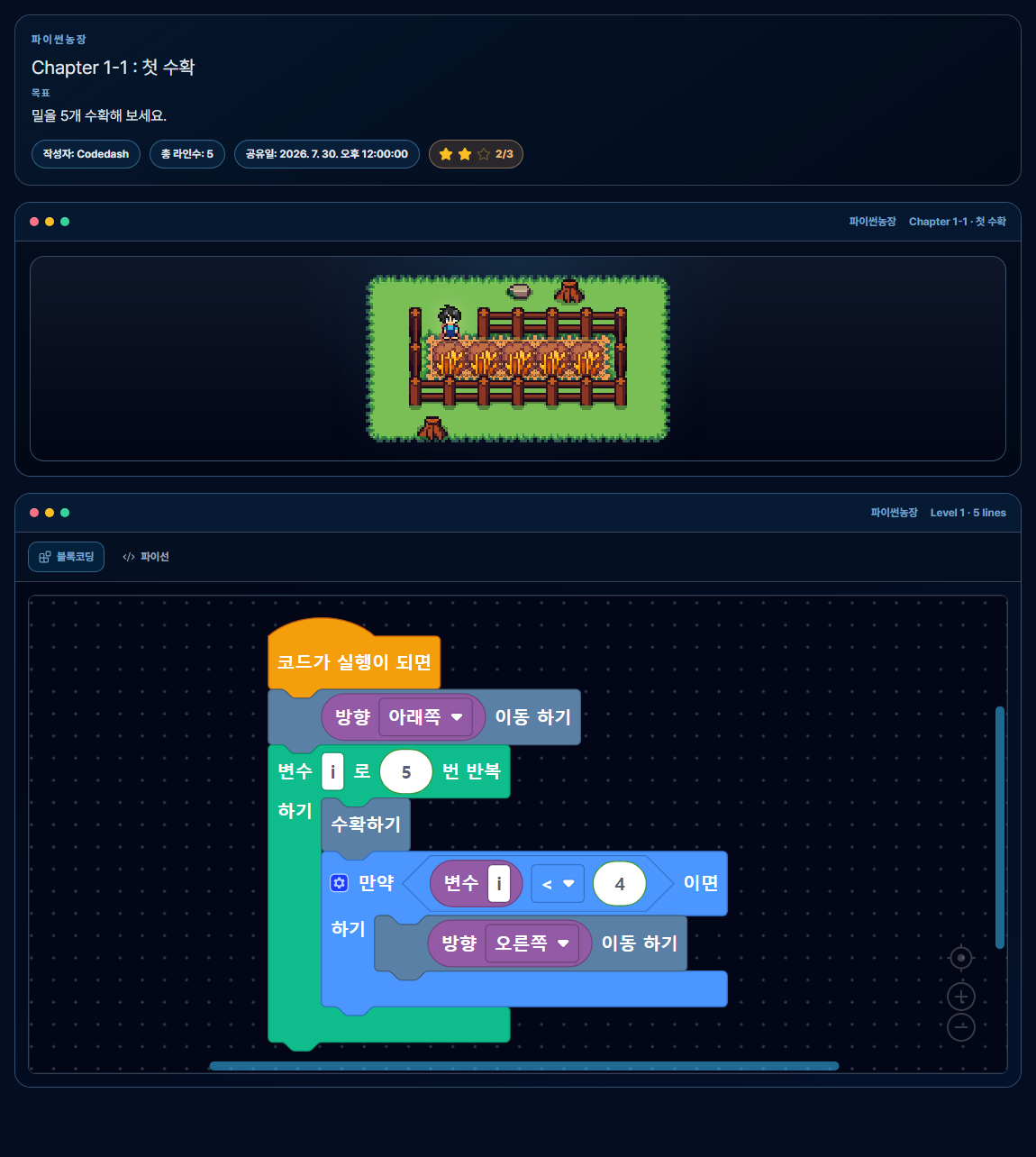
Solution in Blocks
[Run Code]
  ├─ [Move Down]
  └─ [Repeat 5 Times]
      ├─ [Harvest]
└─ [If i < 4, Move Right]Python Code Solution
move(Dir.Down)

for i in range(5):
    harvest()
    if i < 4:
        move(Dir.Right)
There is no need to move again after harvesting the final wheat crop, so the farmer moves right only when i < 4. This level demonstrates function calls, loop counts, and execution order together.
Chapter 2-5 Farmer Basics: From Tilling to Harvesting
CHAPTER 2 · LEVEL 5
In Chapter 2-5, you must till five empty ground tiles, plant tomato seeds, and water them. The crops do not become harvestable immediately, so wait until can_harvest() is true before harvesting.
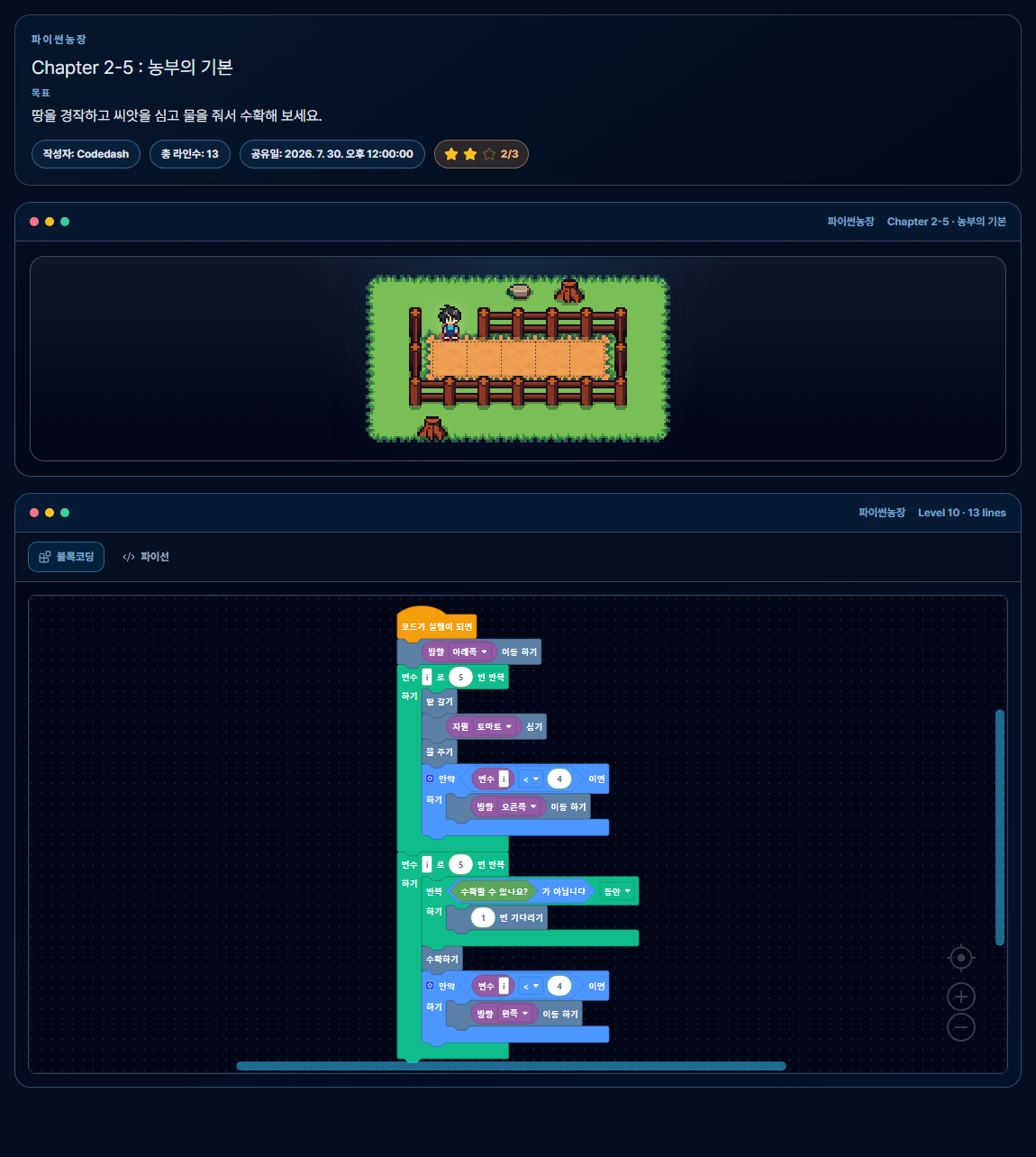
Solution in Blocks
[Repeat While Moving Across 5 Tiles]
  ├─ [Till]
  ├─ [Plant Tomato]
  └─ [Water]

[Repeat While Returning Across 5 Tiles]
  ├─ [Wait Until Harvestable]
└─ [Harvest]Python Code Solution
move(Dir.Down)
for i in range(5):
    till()
    plant(Res.Tomato)
    water()
    if i < 4:
        move(Dir.Right)

for i in range(5):
    while not can_harvest():
        wait(1)
    harvest()
    if i < 4:
        move(Dir.Left)
The first for loop repeats the work sequence on each tile, and the second for loop harvests while moving in the opposite direction. The inner while loop checks when each crop has finished growing.
Chapter 3-5 Basics - Onion Farming: Limited Water and if/else
CHAPTER 3 · LEVEL 5
This level asks you to plant and harvest 25 onions in a 5×5 field. You receive exactly 20 units of water, but the five diagonal tiles have already been watered at the start.
Calling water() again on wet soil still consumes water. You must therefore check whether the current ground is Ground.Tilled and water only the dry tiles to complete all 25 tiles. You also need to remove weeds from the field before planting.
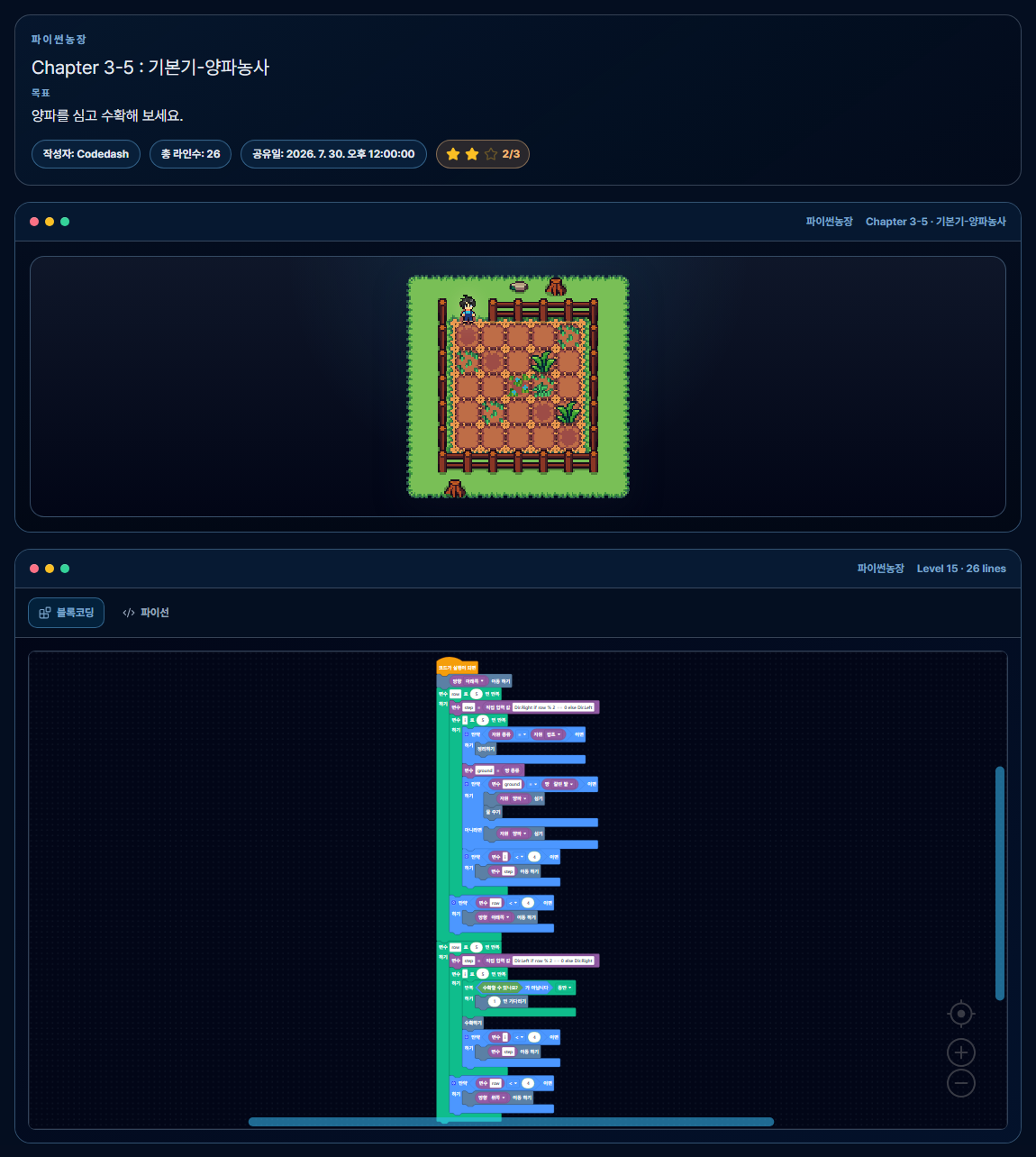
Solution in Blocks
[Traverse 5 Rows in a Zigzag]
  ├─ [Clear if Weed]
  ├─ [ground = Ground State]
  ├─ [If Dry Tilled Soil]
  │    ├─ [Plant Onion]
  │    └─ [Water]
  └─ [Otherwise, Plant Onion Only]

[Return Across the Same Field and Harvest]Python Code Solution
move(Dir.Down)
for row in range(5):
    step = Dir.Right if row % 2 == 0 else Dir.Left
    for i in range(5):
        if get_res_type() == Res.Weed:
            clear()
        ground = get_ground_type()
        if ground == Ground.Tilled:
            plant(Res.Onion)
            water()
        else:
            plant(Res.Onion)
        if i < 4:
            move(step)
    if row < 4:
        move(Dir.Down)

for row in range(5):
    step = Dir.Left if row % 2 == 0 else Dir.Right
    for i in range(5):
        while not can_harvest():
            wait(1)
        harvest()
        if i < 4:
            move(step)
    if row < 4:
        move(Dir.Up)
Use row % 2 to distinguish even and odd rows and reverse the movement direction, allowing you to traverse a large field in a zigzag pattern. The conditional connects the amount of water available with the soil state to prevent unnecessary resource use.
Chapter 4-1 Check Growth Status: Reading Dictionary Values
CHAPTER 4 · LEVEL 1
There are ten tomatoes in the field, but the locations of the ripe tomatoes change each time you run the level. You must harvest only the two tomatoes whose ripeness is 7 or higher; harvesting an unripe tomato causes the mission to fail.
get_res_status() returns the crop state as a dictionary. Reading the value of the ripeness key lets your code decide which crops to harvest instead of relying on color or memorizing their locations.
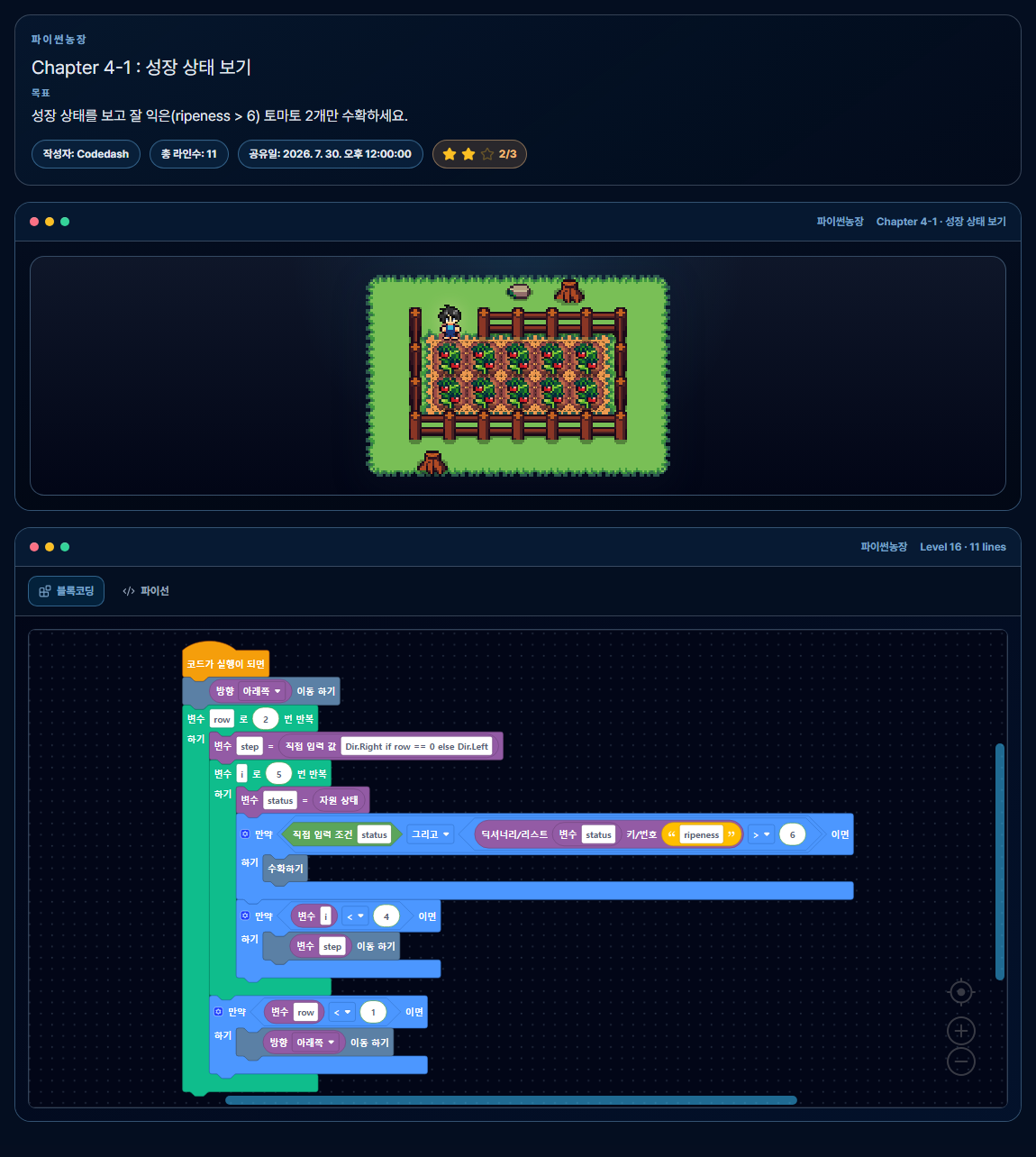
ripeness value from the state dictionary and select only tomatoes with a value of 7 or higher.Solution in Blocks
[Traverse 2 Rows in a Zigzag]
  ├─ [status = Resource State]
  ├─ [If status exists and ripeness > 6, Harvest]
└─ [Move to the Next Tile]Python Code Solution
move(Dir.Down)
for row in range(2):
    step = Dir.Right if row == 0 else Dir.Left
    for i in range(5):
        status = get_res_status()
        if status and status['ripeness'] > 6:
            harvest()
        if i < 4:
            move(step)
    if row < 1:
        move(Dir.Down)
Dictionaries are useful for passing several related states as a single value. In this level, you select and use only the needed ripeness value from resource_type, growthstatus, ripeness, and resource_state.
Chapter 6-5 Night Work: Weed Out Wrong Crops
CHAPTER 6 · LEVEL 5
The nighttime field is dark except around the farmer, so you cannot memorize the locations and types of all crops from the screen in advance. The crop type and quantity to keep in each row are set on that row's sign every time the level runs.
Read the sign's message to find the target crop, and call clear() only when the result of get_res_type() on the current tile differs from the target. Nested loops process the four rows and the four crops in each row.
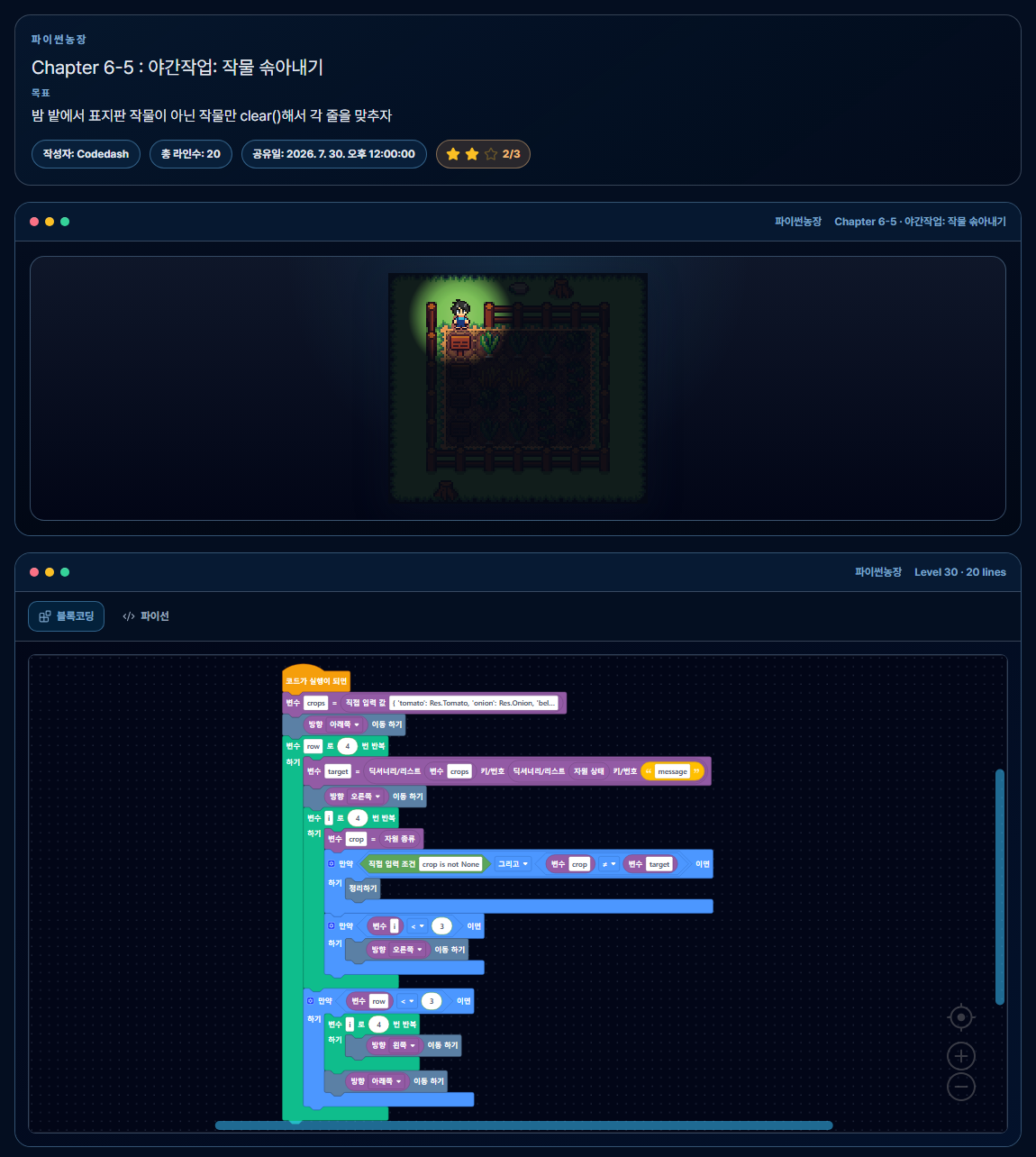
Solution in Blocks
[Map Crop Names to Res Values with a Dictionary]
[Repeat for 4 Rows]
  ├─ [target = Crop on Sign]
  ├─ [Move to Crop Tiles]
  ├─ [Repeat for 4 Crops]
  │    └─ [Clear if Different from target]
└─ [Move to the Next Row's Sign]Python Code Solution
crops = {
    'tomato': Res.Tomato,
    'onion': Res.Onion,
    'bellpepper': Res.Bellpepper,
    'wheat': Res.Wheat,
}

move(Dir.Down)
for row in range(4):
    target = crops[get_res_status()['message']]
    move(Dir.Right)
    for i in range(4):
        crop = get_res_type()
        if crop is not None and crop != target:
            clear()
        if i < 3:
            move(Dir.Right)
    if row < 3:
        for i in range(4):
            move(Dir.Left)
        move(Dir.Down)
The crops dictionary acts as a lookup table connecting the strings on the signs to actual game resources. The key idea is to base actions on states read at runtime rather than on hard-coded locations or crop types.
Chapter 8-3 Legendary 64-Tile Pumpkin: Final Automation Mission
CHAPTER 8 · LEVEL 3
The final level asks you to grow pumpkins on all 64 tiles of an 8×8 field and merge them into one legendary pumpkin. Ready pumpkins merge when they form a complete square, and the entire 8×8 field must grow correctly to produce a size 64 pumpkin.
Individual pumpkins can rot while growing. Rotten pumpkins are excluded from the merge, so you need to check resource states and selectively repair any problem tiles. This final comprehensive challenge combines nested loops over rows and columns, growth waiting, state checks, and exception handling.

size 64 legendary pumpkin covering the entire field.This screen was captured just before harvesting to show the completed pumpkin. The block structure and Python solution code are not provided, preserving the exploration and trial-and-error of the final mission.
Challenge Requirements
- You must traverse all 64 tiles of the 8×8 field without missing any.
- You must plant a pumpkin on each tile and check its growth state.
- Rotten pumpkins cannot merge, so you must find and repair problem tiles.
- You must confirm that the merged pumpkin's
sizeis 64. - To clear the actual level, you must harvest the completed legendary pumpkin.
Why It Helps to View Block Coding and Python Code Together
The Execution Structure Becomes Visible
The block layout clearly shows the order of tilling, planting, and watering, the two execution branches of if/else, and the nested row and column loops.
Express the Same Farming Process with Real Syntax
Compare how loop structures in blocks become for, while, range(), and indentation.
Syntax Gains a Practical Purpose
Loops process a large field, conditionals conserve water, and dictionaries connect signs with crop states.
See the Results Immediately
Run the code to see the farmer move and crop states change on screen; if the result differs from your expectation, revise the code and run it again.
Codedash runs in the browser without requiring a separate Python environment. After examining the structure with blocks, you can express the same problem again in Python code and gradually expand the scope of your automation.
Explore Core Python Syntax on the Farm Now
Every Python Farm chapter is free to play without signing in or paying. Starting with movement and harvesting, the automation gradually expands to tilling, planting, watering, and waiting for growth.
Start Python Farm Chapter 1Chapter 2 unlocks after you complete the five levels in Chapter 1.
Later chapters also cannot be skipped; each one unlocks only after you complete the preceding chapter. All chapters from Chapter 1 to Chapter 8 are free, with no sign-up or login required.
Frequently Asked Questions
Are all Python Farm functions built-in Python functions?
No. move(), harvest(), plant(), and get_res_status() are game-specific functions provided by Python Farm. Features such as for, while, if/else, and dictionaries are actual Python syntax.
Do I have to solve every level using only block coding?
No. In Python Farm, you can switch between the Block Coding and Python tabs. You can inspect the structure with blocks first or write Python code directly.
Can I water every tile in Chapter 3-5?
No. You have only 20 units of water, and five tiles have already been watered. Calling water() on an already wet tile still consumes water, so check the soil state and water only the 20 dry tiles.
Why is there no solution code for Chapter 8-3?
The Legendary 64-Tile Pumpkin is a final mission that combines movement, nested loops, state checks, and exception handling learned earlier. The completed goal is shown, but the solution code is withheld so you can retain the challenge of designing the algorithm yourself.
Are Chapter 3 and later levels also free?
Yes. Every chapter is free and needs no login. You still need to complete each chapter to unlock the next one.